Evals
Trace logging and the /evals dashboard for monitoring Discord bot interactions.
Note: The evals system is built and ready. We need community members actively interacting with Slop and the wiki-base before we'll have meaningful data to evaluate. Once we have real usage, this becomes the primary feedback loop for improving bot quality.
Trace Logging
Every Discord bot interaction logs a full trace to the chats table in Turso.
What Gets Logged
| Field | Description |
|---|---|
| Thread ID | Discord thread where the interaction happened |
| User message | The original user prompt |
| Bot response | Full text of Slop's reply |
| Tool calls | Each tool call: name, arguments, result summary, duration (ms) |
| Retrieval method | agentic, smalltalk, or latest_node_lookup |
| Model | LLM model used (e.g. claude-sonnet-4-6) |
| Latency | Total request time in milliseconds |
| Member ID | If the user has /joined, their member node ID |
| Discord context | Channel, guild, thread metadata |
Tool Call Traces
Each tool call in the agentic loop is captured individually:
{
  "tool": "slop_search_nodes",
  "args": { "query": "Terminal-Bench", "limit": 5 },
  "result_preview": "Found 3 nodes...",
  "duration_ms": 142
}
This gives full visibility into what the LLM searched for, what it found, and how long each step took.
Evals Dashboard
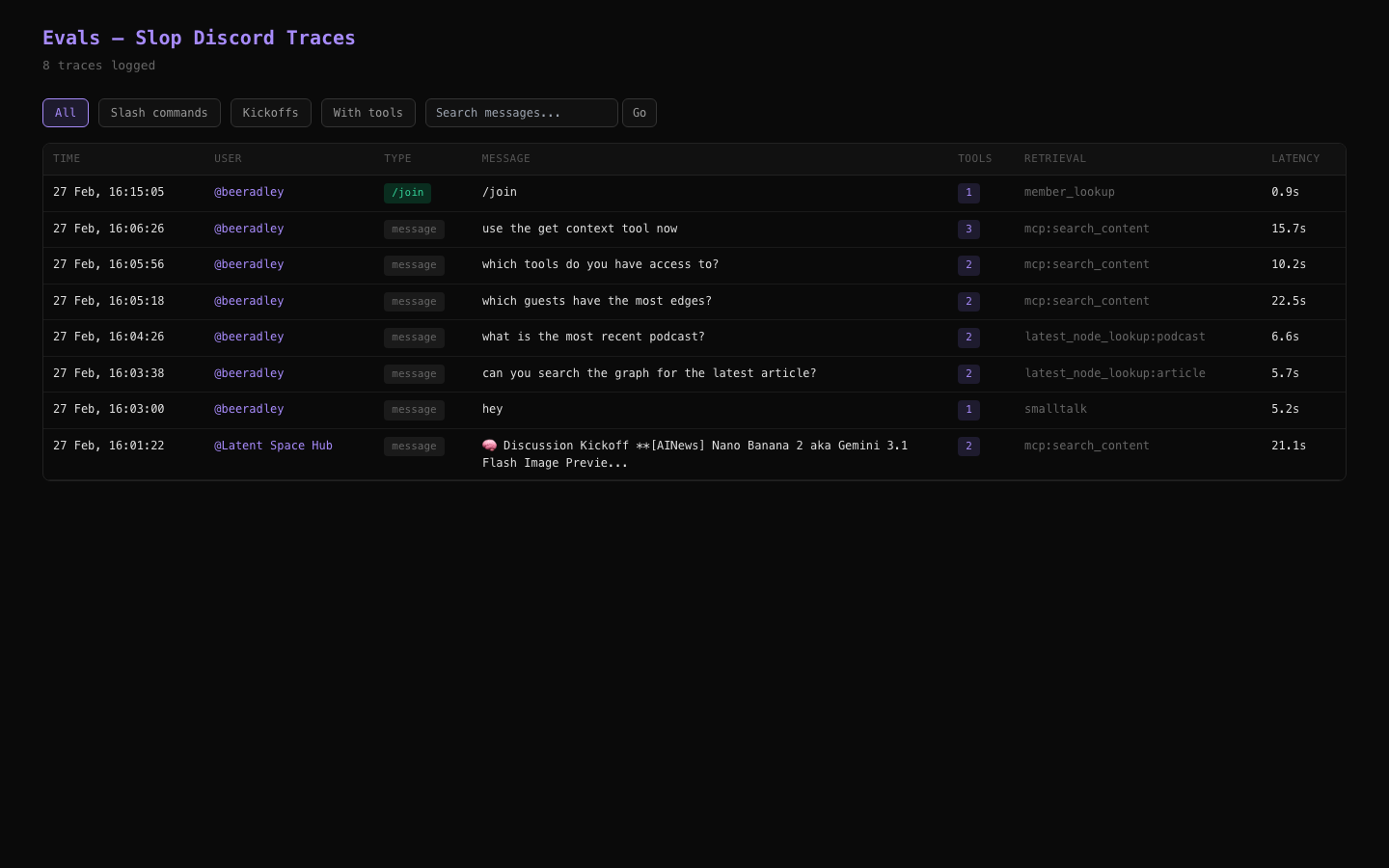
The /evals page on the web app provides a visual interface for reviewing bot interaction traces.
Features
- Chronological feed of all bot interactions
- Expandable traces showing the full tool-calling chain for each interaction
- Tool call details: arguments, results, timing for each tool call
- Filter by retrieval method: see only agentic, smalltalk, or kickoff interactions
- Response quality review: compare what the bot said against what was in the wiki-base
Access
Navigate to /evals on the web app. Requires the app to be running (not available in readonly mode).
Trace Metadata
The full metadata JSON stored per interaction:
{
  "discord_user_id": "123456789",
  "discord_username": "swyx",
  "discord_channel_id": "987654321",
  "discord_message_id": "111222333",
  "retrieval_method": "mcp:search_content",
  "context_node_ids": [42, 87, 153],
  "tool_calls": [
    {
      "tool": "slop_search_content",
      "args": { "query": "transformer architecture", "limit": 6 },
      "result": { "results_count": 5 },
      "duration_ms": 230
    }
  ],
  "member_id": 55,
  "model": "anthropic/claude-sonnet-4-6",
  "is_slash_command": false,
  "is_kickoff": false,
  "response_length": 1847,
  "latency_ms": 2300
}
Tool call results are summarized to keep row sizes reasonable: large results are reduced to counts like { "results_count": 5 }.
Querying Traces via SQL
-- Recent Discord traces
SELECT id, user_message, created_at,
       json_extract(metadata, '$.discord_username') as username,
       json_extract(metadata, '$.latency_ms') as latency,
       json_extract(metadata, '$.retrieval_method') as method
FROM chats
WHERE chat_type = 'discord'
ORDER BY created_at DESC
LIMIT 20;

-- Traces with tool errors
SELECT id, user_message, json_extract(metadata, '$.tool_calls') as tools
FROM chats
WHERE chat_type = 'discord'
  AND json_extract(metadata, '$.tool_calls') LIKE '%"error"%';

-- Average latency by retrieval method
SELECT json_extract(metadata, '$.retrieval_method') as method,
       COUNT(*) as count,
       AVG(json_extract(metadata, '$.latency_ms')) as avg_latency_ms
FROM chats
WHERE chat_type = 'discord'
GROUP BY method;